VP + Fibonacci 24h Indicator (TradingView)
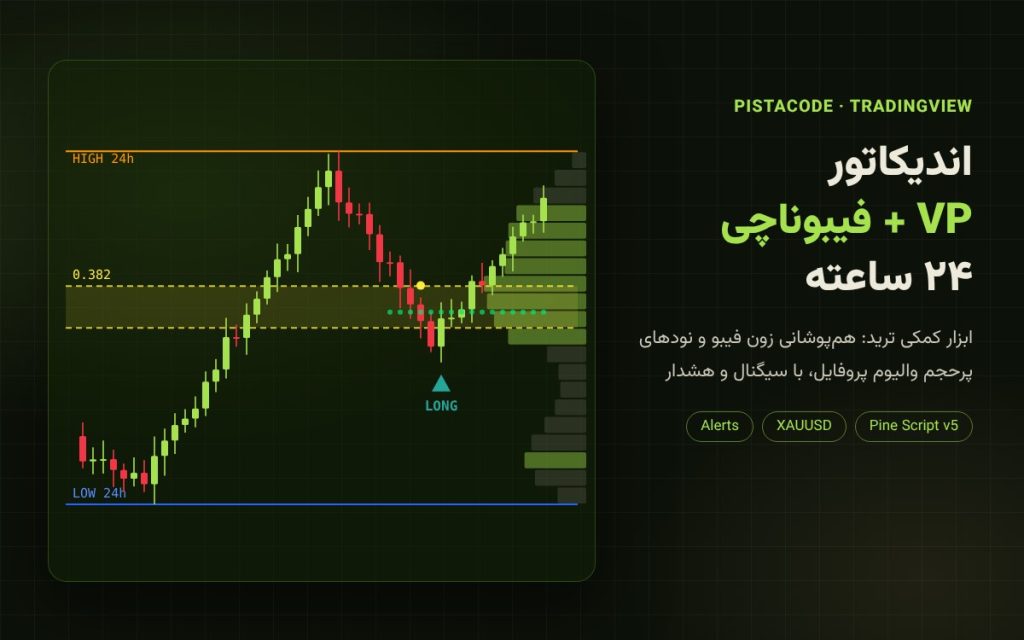
The VP + Fibonacci 24h indicator is a trading assistant for TradingView that combines two popular analysis tools, Fibonacci retracement and Volume Profile, and only gives a signal when both agree on the same price zone. It is designed and tuned for gold (XAUUSD) and also works on high-volume currency pairs and cryptocurrencies.
How does it work?
- It finds the high and low of the last 24 hours and reads the market direction from the order in which they formed: an upward move → buys only; a downward move → sells only.
- It draws the 0.382–0.5 Fibonacci zone of that move: the healthy retracement area.
- It splits the 24-hour Volume Profile into 20 price levels and marks the high-volume nodes as strong support and resistance.
- When price enters the zone it gives a first confirmation, and only if a support node (for buys) or a resistance node (for sells) also sits inside that same zone does it issue a LONG or SHORT signal. One signal per new high or low, with no repeated signals.
- Automatic take-profit and stop-loss: take-profit at 85% of the last three days’ range and a percentage-based stop-loss, both adjustable.
Features
- Shows the 24-hour high and low, the Fibonacci zone and Volume Profile support/resistance on the chart
- Buy and sell signals filtered by Fibonacci and volume confluence
- Alerts on mobile, email and desktop through TradingView
- Full backtest in the Strategy Tester (net profit, win rate, maximum drawdown)
- More than 10 adjustable settings: time range, Fibonacci levels, volume threshold, take-profit, stop-loss and more
- Settings menu in Persian
What you get
- The indicator file (Pine Script v5) for TradingView
- A complete PDF guide in Persian, included with the indicator: step-by-step installation in TradingView, every setting and chart marker explained, alert setup, recommended timeframes and markets, a trade-entry checklist, trade and money management, and answers to common questions
- Instant download after payment from the Downloads section of your account
Requirements
A TradingView account (the free plan is enough). We recommend the 5- or 15-minute timeframe and a symbol with volume data. Installation takes about 2 minutes, and it works on TradingView web, desktop and the mobile app.
Important: this indicator is not 100% accurate
No indicator is right 100% of the time, and this tool will also give wrong signals. It is a decision-support tool, not a guaranteed trading system. If you manage your position size and stop-loss properly, it can support profitable trades alongside your own analysis; money and risk management are explained in full in the guide. Past results do not guarantee future performance, and this product is not investment advice.